Unit
Overview
The Unit section captures responding EMS unit details, including vehicle identification, service classifications, and equipment capabilities. NEMSIS standards require single EMS unit documentation per patient care report.
Before You Start
Unit fields auto-populate based on apparatus default configuration in the Back-Office. Verify auto-populated information matches your current unit configuration. Multiple responding units cannot be documented as EMS units within the same ePCR due to NEMSIS compliance requirements.
EMS Unit Documentation
Manually document the responding unit with NEMSIS compliance.
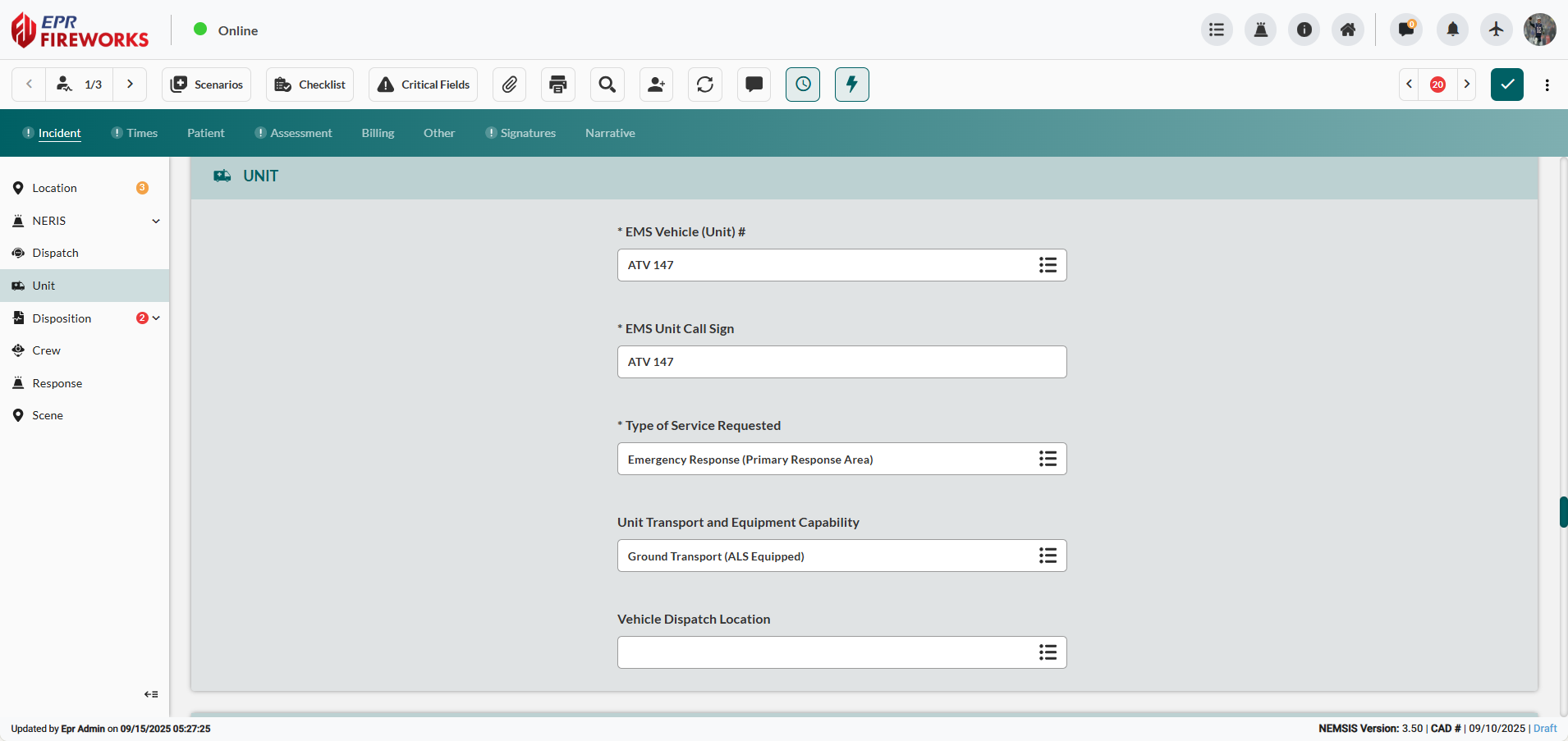
Scroll down to the Unit section.
Click EMS Vehicle (Unit) #, and then select the apparatus from the sidebar.
Complete EMS Unit Call Sign matching radio designation.
Click Type of Service Requested, and then select the corresponding type of service.
Select Unit Transport and Equipment Capability from the corresponding sidebar.
NEMSIS Compliance Notes
Single Unit Requirement: NEMSIS standards allow only one EMS vehicle per patient care report. Additional responding fire apparatus should be documented in fire incident reporting rather than ePCR.
Unit Disposition: Final unit status information may be captured in the Disposition section after completing patient care activities.
Next Steps
After completing unit documentation:
Proceed to Crew to assign personnel to documented unit
Return to Incident Documentation Overview for complete workflow navigation